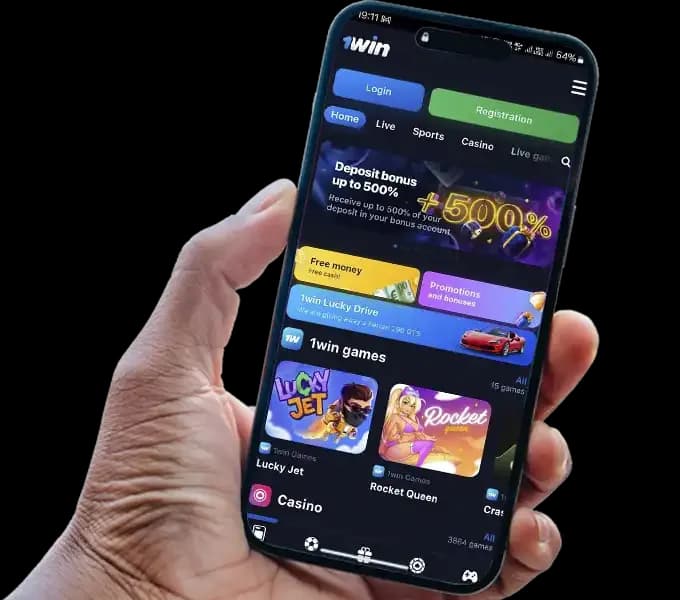
This page explains how to get 1Win on your iPhone or iPad, what the iOS version actually is, how it compares to the full website, and what to do if something goes wrong during installation or login.
Is There a 1Win App for iPhone
There is no native 1Win app available on the Apple App Store. Apple’s policies restrict gambling applications in many regions, which means 1Win — like most betting platforms — cannot distribute a dedicated iOS app through official Apple channels.
What 1Win offers for iOS users is a Progressive Web App (PWA). This is a version of the 1Win website that is optimized for mobile browsers and can be added to your iPhone or iPad home screen. Once added, it behaves like an installed app — it opens in full screen, has its own icon, and loads quickly without going through Safari first.
The PWA covers all core platform functionality: sports betting, casino games, live streaming, deposits, withdrawals, and account management. There is no difference in features between the PWA and the desktop website.

Start Downloading 1Win iOS App
How to Install the App on iOS
The installation process takes less than a minute and works on any iPhone or iPad running a current version of iOS. It must be done through Safari — other browsers on iOS do not support the Add to Home Screen function in the same way.
- Open Safari on your iPhone or iPad. Do not use Chrome, Firefox, or any other browser for this step.
- Navigate to the official 1Win website.
- Tap the Share button at the bottom of the screen — it looks like a box with an arrow pointing upward.
- Scroll down in the Share menu and tap Add to Home Screen.
- A name field will appear. You can leave it as is or rename it. Tap Add in the top-right corner.
- The 1Win icon will now appear on your home screen.

Instructions 1Win iOS App
To open the app from this point forward, simply tap the icon on your home screen. It will launch directly without opening Safari first.
If you do not see the Share button, make sure you are using Safari and that the browser toolbar is visible at the bottom of the screen. Scrolling down on a page sometimes hides the toolbar — tap the bottom of the screen once to bring it back.

iOS 1Win App Add to Home Screen
What Limitations Exist on iPhone and iPad
Because the 1Win iOS version is a PWA rather than a native app, there are a few differences compared to what Android users experience with the dedicated APK.
Push notifications are limited. Native iOS apps can send full push notifications, but PWAs on iOS have limited notification support depending on your iOS version. You may not receive real-time bet updates or promotional alerts the same way Android users do.
No App Store updates. The PWA updates automatically when you open it, since it loads content from the 1Win servers. You do not need to manually update it. However, this also means the version you use depends on your internet connection — the PWA requires an active connection to function, unlike a fully installed native app.
iOS system restrictions apply. If Apple’s Safari updates change how PWAs behave, it can affect the 1Win PWA. In practice this is rare, but it is worth knowing that the experience is tied to Safari’s capabilities on your device.
Some older iOS versions may experience reduced performance. If your device is running iOS 13 or earlier, certain interface elements may not render correctly. Updating to the latest available iOS version for your device resolves most compatibility issues.
Despite these limitations, the PWA functions well for the full range of 1Win features on current iPhones and iPads.
How the App Differs from the Mobile Website
When you access 1Win through Safari without adding it to your home screen, you are using the mobile website. The PWA installed on your home screen is technically the same codebase, but the experience differs in a few practical ways.
The PWA opens in full-screen mode without Safari’s address bar or navigation buttons. This gives more screen space to the game or betting interface and makes it feel closer to a native app.
Loading is faster on repeat visits. The PWA caches certain resources locally, which means it loads more quickly than opening a fresh browser tab each time.
The icon on your home screen makes access more direct. Rather than opening Safari and navigating to the site, you tap one icon from your home screen.
Session persistence tends to be better. Logging in through the PWA keeps you signed in more reliably across sessions compared to the mobile browser, where clearing browser data or switching tabs can reset your session.
For practical purposes, if you use 1Win regularly on your iPhone, installing the PWA is worth doing for the improved loading speed and easier access alone.
1Win Apps Menu
Common Errors During Installation and Login
The Share button does not show the Add to Home Screen option This happens when you are not using Safari. Chrome and Firefox on iOS do not support this feature in the same way. Switch to Safari and try again.
The 1Win website does not load in Safari In some countries, 1Win’s main domain is blocked by internet service providers. If the page does not load, try using a VPN, or ask 1Win support for the current mirror site address. Once you have access, you can install the PWA from the mirror URL as well.
The PWA icon opens but shows a blank screen or fails to load This is usually a cache issue. Press and hold the 1Win icon on your home screen, delete it, and reinstall it from the website. Alternatively, go to Safari Settings and clear the website data for 1Win, then try adding it to your home screen again.
Login fails after installation Check that you are entering the correct email or phone number and password. If you registered via social media, use the social media login option rather than typing credentials manually. If you have forgotten your password, use the Forgot Password link on the login screen and follow the recovery email instructions.
The page looks broken or elements are not displaying correctly Update your iOS to the latest version available for your device. Outdated Safari versions can cause rendering issues with the PWA. If updating is not possible, try using the standard mobile browser version of the site instead.
Deposits are not going through on the PWA Some payment methods redirect to an external page to complete the transaction. If that redirect fails on the PWA, try completing the deposit through Safari directly rather than the home screen PWA. The functionality is identical — only the browser chrome differs.

Sign Up at 1Win on iOS
Security and Updates
The 1Win PWA on iOS is served over HTTPS, meaning the connection between your device and the platform is encrypted. You should always verify that the URL in Safari shows a padlock icon and begins with https:// before logging in or making any financial transaction.
Only install the PWA from the official 1Win website or a verified mirror site provided by 1Win support. Do not install it from third-party links sent via messages or email — phishing sites mimic the appearance of real platforms to steal login credentials and payment details.
The PWA updates automatically each time you open it with an internet connection. There is nothing you need to do manually to keep it current. If you notice that the interface looks outdated or certain features are missing, deleting the home screen icon and reinstalling it from the website forces a fresh install.
For account security, avoid saving your 1Win password in shared or public devices, and log out after each session if someone else has access to your phone. Enabling Face ID or Touch ID through your device’s general security settings adds an additional layer of protection for accessing your device and the apps on it.