


How to Register at 1Win
Opening a 1Win account takes under two minutes and unlocks the full casino library, sports betting, and a four-part welcome package worth up to 600% on your first deposits. There are three ways to sign up — quick registration by phone or email, registration through a linked social account, or registration inside the mobile app — and all three lead to the same account, the same game library, and the same bonus eligibility. You can also browse most of the slot catalog in demo mode before registering, so you don’t need a deposit, or even an account, just to see what’s on offer.
How to Register at 1Win
The only real decision that matters at signup is your account currency, since it can’t be changed later. Everything else below is designed to get you through registration once, correctly, without needing a second account.
| Method | Time needed | What you'll need | Best for |
|---|---|---|---|
| Quick registration | ~1 minute | Phone or email, currency choice | Fastest signup, no third-party account required |
| Social network | ~30 seconds | An existing Google, Telegram, or similar linked account | Users who want to skip password creation |
| Mobile app | ~2 minutes | The app installed, phone or email | Players who plan to bet primarily from a phone |
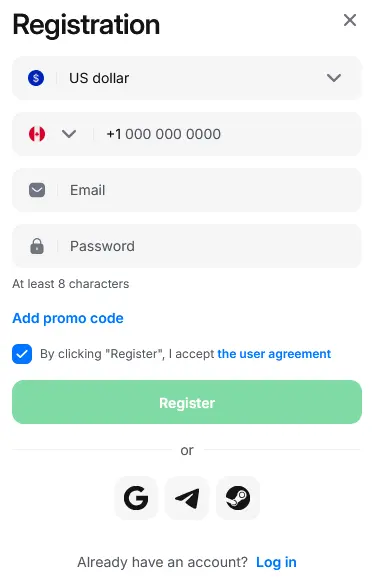
Registration at 1Win
Quick Registration by Phone or Email
This is the most direct signup route and doesn’t require any third-party account.
- Open the 1Win homepage and click Registration in the top right corner.
- Choose your preferred currency. This cannot be changed after the account is created, so confirm it’s the currency you’ll actually deposit in — USD is the most straightforward choice if you plan to use international payment methods.
- Select either the phone number or email tab, then enter your details.
- Create a password of at least 8 characters. A weak password is one of the most common reasons accounts get flagged for extra security checks later.
- If you have a promo code from a partner site or ongoing campaign, enter it in the optional promo code field before submitting — it’s typically the only chance to add one, since most codes can’t be applied retroactively. If you don’t have one, you can leave it blank and still qualify for the standard welcome package.
- Confirm you’re 18 or older and agree to the user agreement, then click Register.
- Check your phone or inbox for a confirmation code and enter it to activate the account.
Registration via a Social Network
Linking an existing account skips password creation entirely and is the fastest option if you’re already signed in on your device.
- On the registration screen, select the social login icons instead of the phone/email tab.
- Choose from the available options. Google and Telegram are consistently available; depending on your region and device, you may also see Facebook, VKontakte, Yandex, or Mail.ru.
- Log in to that account if you aren’t already, and grant the requested permissions — typically just your basic profile name and email, not contacts or calendar access.
- Confirm your currency, since this step is still required even with social signup.
- Review and accept the terms and privacy policy.
Your account is created instantly — there’s no separate confirmation code step, since the linked account already verifies your identity. One trade-off worth knowing: social registration shares your basic account name and email with 1Win automatically. If you’d rather keep that information separate, the phone/email method gives you more control over what’s shared.
Registration via the Mobile App
Registering inside the Android or iOS app follows the same logic as the website but is built for a smaller screen.
- Install the Android App or iOS App and open it.
- Tap Registration on the welcome screen.
- Pick quick registration or a linked social account, exactly as on desktop.
- Fill in your details, confirm your currency, and enter a promo code if you have one.
- Accept the terms of service.
- Enable push notifications if prompted. This is optional, but it’s the fastest way to get notified when a deposit or verification is processed.
- Confirm via the code sent to your phone or email (skipped for social signup).
Once confirmed, you’re taken straight to the deposit screen.
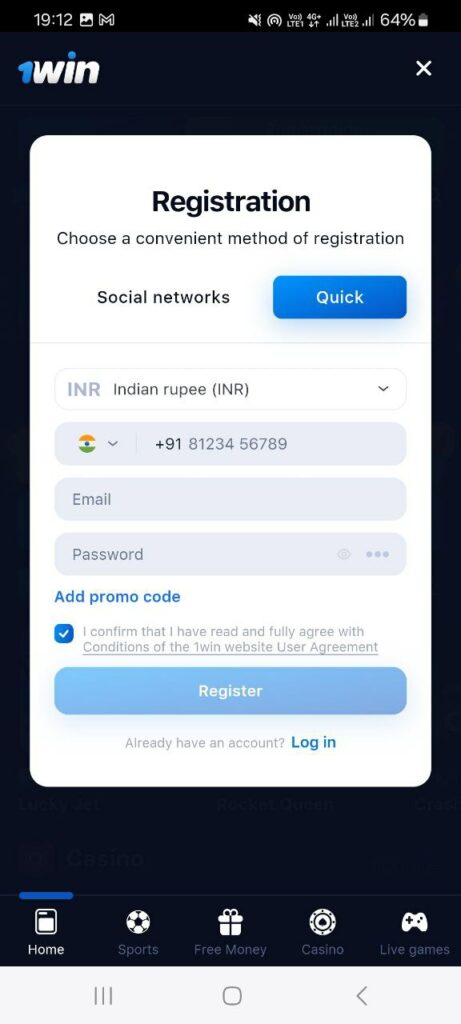
Registration via the 1Win mobile app
Regional Availability
Account availability depends on your country of residence, and a small number of jurisdictions are excluded from registration or from specific promotions due to local licensing restrictions. If you travel frequently or use a VPN, note that account access and currency options are generally tied to the country you registered from, not your current location — trying to bypass a restriction can trigger a review of your account. If you’re unsure whether your country is supported, the fastest way to confirm is to attempt registration; the form will flag it immediately rather than letting you complete signup and find out later.
Registration Issues and Troubleshooting
Most signup problems come down to a handful of common causes, and nearly all of them are quick to fix.
Confirmation code doesn’t arrive. Double-check the country code on your phone number, wait a minute for delivery delays, and confirm you haven’t mistyped your email. If it still doesn’t come through, clearing your browser cache or switching to a different browser or device usually resolves it.
“Account already exists” error. 1Win allows one account per person, so this usually means you (or someone using the same device or network) has registered before. Use the Forgot Password option instead of trying to create a second account — attempting a second registration on the same device is one of the more common ways players accidentally trip a duplicate-account review.
Locked out or forgotten password. Click Login next to the Registration button, select Forgot Password, and enter the email linked to your account. Follow the reset link sent to that email to set a new password.
Form won’t submit or fields reset. This is typically a temporary browser issue — clearing cache, disabling extensions, or trying an incognito window resolves it in most cases.
Securing Your New Account
Once your account is active, it’s worth spending thirty seconds on security before you make your first deposit. Enable two-factor authentication (2FA) from Account Settings, which adds a one-time code from an authenticator app to every login on top of your password. This is the single most effective way to prevent someone else from accessing your account and funds if your password is ever compromised — without it, a leaked password is often all it takes for someone to log in and drain a balance before you notice.
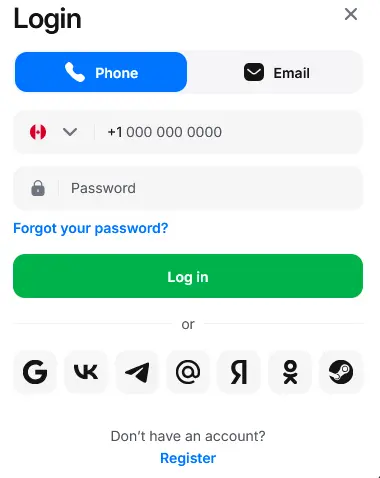
Login at 1Win
Welcome Bonus for New Accounts
New players who register and make a deposit become eligible for a four-part welcome package worth up to 600% plus 500 free spins. The exact structure depends on which payment method you deposit with — crypto deposits earn a higher match than card or e-wallet deposits, largely because they settle faster and carry lower processing and chargeback risk for the operator, which is passed on to players as a better rate.
Cryptocurrency deposits (up to 600% + 500 FS):
| Deposit | Match | Free Spins | Minimum deposit |
|---|---|---|---|
| 1st | 130% | 70 | $10 (USDT equivalent) |
| 2nd | 140% | 100 | $10 |
| 3rd | 160% | 150 | $10 |
| 4th | 170% | 180 | $10 |
Other payment methods (up to 500% + 500 FS):
| Deposit | Match | Free Spins | Minimum deposit |
|---|---|---|---|
| 1st | 100% | 70 | $5 |
| 2nd | 120% | 100 | $5 |
| 3rd | 130% | 150 | $5 |
| 4th | 150% | 180 | $5 |
Worked example: a $200 first deposit through a standard payment method earns a 100% match, adding $200 in bonus funds for $400 in total playable balance. The same $200 deposited in crypto would instead earn a 130% match, adding $260 in bonus funds — a $60 difference on the first deposit alone, before the gap widens further on deposits two through four.
A few conditions worth knowing before you deposit:
- Free spins unlock in sequence. They aren’t credited alongside the deposit itself — each batch becomes available only after the percentage match on that same deposit has been fully wagered.
- The wagering requirement is 40x the bonus amount, and it must be completed specifically in games from the “Bonus wagering” category inside the Casino lobby, not just any title. Slots are typically the fastest way to clear it.
- Each bonus activates once. Activating a new bonus forfeits any bonus currently in progress, and skipping a deposit doesn’t carry its unused percentage forward to a later tier.
- Requesting a withdrawal while a bonus is active forfeits that bonus and any related winnings — clear the wagering requirement first.
- 1Win reserves the right to change or cancel the promotion at any time and to review account activity for signs of bonus abuse; confirmed abuse can result in forfeited winnings.
Bonus terms run as a time-limited promotion rather than a permanent offer, so check the live percentages, caps, and expiry date on the current Bonuses card before depositing rather than relying on fixed numbers from any guide, including this one. Beyond the welcome package, returning players typically have access to ongoing weekly cashback on casino losses and an invite-only VIP program for high-activity accounts — worth checking once your welcome bonus is cleared.

Welcome Bonus 1Win
Account Verification (KYC)
Verification confirms your identity and follows standard Anti-Money Laundering (AML) and Know Your Customer (KYC) practices common across licensed operators. Importantly, it isn’t always required the moment you register or even before your very first withdrawal — for smaller accounts, you can often deposit, play, and make an initial withdrawal without uploading documents. Verification typically becomes mandatory once you request a withdrawal above a certain threshold (commonly cited around $1,000), after several successful withdrawals, or if the system flags your account for review. Once triggered, you won’t be able to complete further withdrawals until it’s done, so it’s worth treating it as something to prepare for in advance rather than something to deal with once it blocks a payout.
Typically requested:
- A government-issued photo ID (passport, national ID card, or driver’s license) showing your full name and date of birth
- Proof that the payment method used matches your account name — third-party cards, wallets, or bank accounts are not accepted for withdrawals
- In some cases, a selfie holding the ID, requested if the initial documents don’t fully confirm your identity
- For withdrawals over $1,000, additional re-verification of documents may be requested even if you were previously verified
Documents are uploaded from the Profile > Verification section of your account. Review times vary by case load and document type, with straightforward ID checks often clearing within a few hours and selfie or re-verification requests taking closer to the 3-business-day upper end — plan for the longer window so a slow review doesn’t catch you off guard mid-withdrawal. You’ll be notified once it’s complete.
Completing verification proactively, before you’ve built up a balance or requested a large withdrawal, is the most reliable way to avoid delays later. An account flagged for verification mid-withdrawal leaves that request stuck in “Pending” status until documents are approved.
If verification is rejected, the most common causes are a blurry photo, an expired document, or a name mismatch between your ID and your registration details. Re-submitting a clearer photo or correcting the account name usually resolves it. There’s no penalty for a second attempt, but if the same document type keeps failing — for example, a driver’s license with poor photo quality — switching to a passport or national ID card on the next attempt is typically faster than repeating the same document.
Common Registration Mistakes to Avoid
- Choosing the wrong currency at signup. This can’t be changed later — a mismatched account currency usually means losing money to conversion fees on every deposit and withdrawal, and switching means opening an entirely new account.
- Registering more than one account. Multi-accounting is against the terms of service and can result in funds being frozen across all linked accounts, not just the bonus.
- Entering a name that doesn’t match your ID. This is the single most common cause of verification delays — use your full legal name exactly as it appears on your document, not a nickname or shortened version.
- Delaying verification until it’s forced by a large withdrawal. Submitting documents early, before you actually need to cash out, means one less thing standing between you and your money when it matters.
- Requesting a withdrawal mid-wagering. Doing so while a bonus is still active cancels the bonus and any winnings tied to it — finish the wagering requirement first, or withdraw only from your real balance.
- Trying to withdraw to a different payment method than the one used to deposit. Withdrawals must go back through the same method for security reasons; using someone else’s card or wallet gets a transaction blocked automatically.
- Skipping 2FA setup. It takes under a minute and is the simplest safeguard against unauthorized account access.
 Oliver Bridgewater

