


The 1Win desktop client for Windows gives you faster access to the casino and sportsbook without a browser tab open — but it’s worth understanding exactly what kind of application it is before installing it, since that shapes what it can and can’t do for you. This guide covers installation, real system requirements, an honest explanation of what the app actually is under the hood, how updates and Mac compatibility actually work, and fixes for the specific errors people run into.
Is There a 1Win App for Windows
Yes — unlike iOS, where 1Win offers a browser-based shortcut (a PWA) rather than a true installable app, Windows gets a genuine downloadable client with its own installer file. It’s worth knowing what that client actually is: it’s a lightweight wrapper around the same site you’d reach in a browser, not a large, fully self-contained offline program. That’s not a downside — it’s exactly why the file is small and installs in seconds — but it does mean the client still needs to reach 1Win’s servers to function, the same as a browser would.
It’s also worth knowing upfront: the Windows app doesn’t unlock anything a browser account can’t already access. There are no bonuses, promotions, or features reserved exclusively for app users — the welcome offer, loyalty program, and cashback all apply identically whether you play through the app, the mobile site, or a desktop browser. And per 1Win’s one-account policy, the app uses the same single account as every other channel — there’s no separate registration or duplicate-account workaround through the desktop client.
1Win for Windows Download Button
How to Install the Application
- Go to the official 1Win site and find the Windows download option — typically in the header or footer, marked with the Windows logo.
- Click to download the installer file directly to your computer.
- Open the downloaded file and follow the installation prompts.
- Once installed, an icon appears on your desktop — open it and log in with your existing 1Win registration, or register directly from the client.
The installer isn’t distributed through the Microsoft Store, which is why Windows SmartScreen may show a warning the first time you run it — more on exactly what to do about that below.
System Requirements
| Requirement | Details |
|---|---|
| Operating system | Windows 7 or later |
| Processor | 1.2 GHz or higher |
| RAM | 1 GB or more |
| Installer size | Approximately 2.78 MB |
| Internet connection | Required for all functionality — the client is not a fully offline program |
The small installer size reflects what the client actually is: a fast-launching wrapper that loads content from 1Win’s servers once running, rather than a large standalone package bundling everything locally. That’s a meaningful detail to understand before assuming the installed app has abilities a browser doesn’t.
How the App Differs from the Website
What genuinely improves: launch speed once installed — no need to type a URL or navigate through a browser — and, in most cases, faster page loading within the client itself, since it isn’t competing for resources with other open browser tabs. The client also keeps you logged in between sessions and surfaces in-app notifications for promotions and account activity without needing a browser open.
What doesn’t change: the app connects to the same servers the website does. This matters specifically for the question people most often ask about it — whether installing the app helps if the site is blocked in your country. It can help with browser-specific friction (a blocked bookmark, a flagged browser extension, cached DNS issues), but it is not a guaranteed workaround for a network-level country block, since the client still depends on reaching the same infrastructure a browser would. If your country blocks access at the network level, the app can be affected by that too — see the mirror-link and VPN options in the errors section below for what actually helps in that specific case.
There’s currently no native macOS application — Mac users have two realistic options. The simple one is accessing the same functionality through a browser and saving a desktop shortcut to the site, which behaves similarly to the iOS PWA experience. The more involved option, for advanced users who specifically want the actual Windows .exe client rather than a browser shortcut, is running it inside Windows virtualization software such as Parallels — this runs a genuine copy of Windows on the Mac, so the client behaves exactly as it would on a PC, at the cost of needing that virtualization software set up first.
Because 1Win’s domain has changed periodically due to regional restrictions, verify you’re downloading from a currently active official link rather than a bookmarked or search-result domain that may be outdated or spoofed. A legitimate installer will never ask for your account password during the download step itself — only after installation, inside the app.
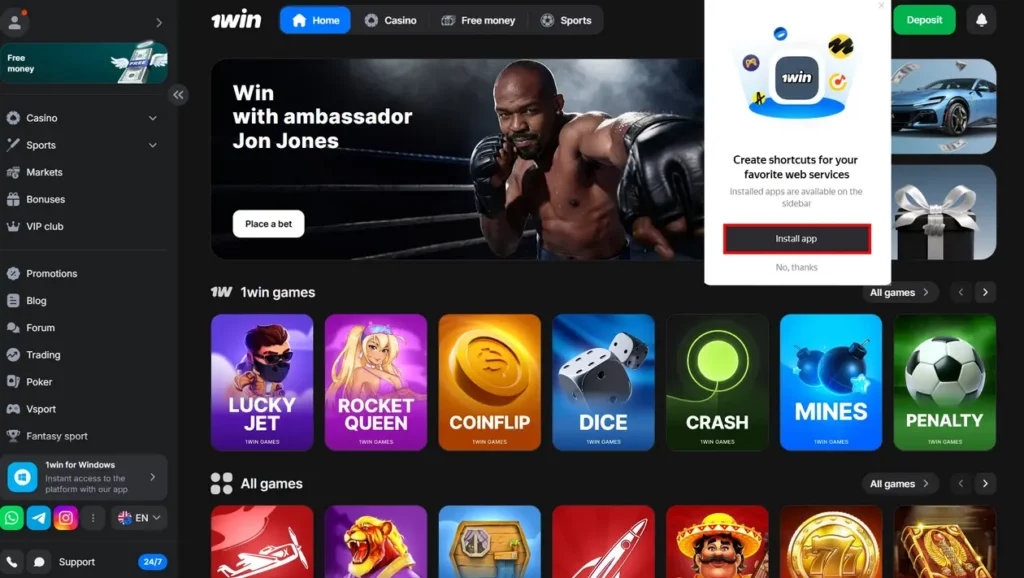
Install 1Win App Windows
Keeping the App Updated
The client checks for a new version on launch in most cases, and an available update is typically announced through 1Win’s official channels (site news or social media) rather than always through an automatic in-app prompt. If you notice the app behaving inconsistently or lagging compared to normal, checking for a newer installer on the official site — or contacting support to confirm whether a known issue is affecting the current version — is the first troubleshooting step before assuming something is broken locally.
Common Errors and How to Fix Them
Windows SmartScreen blocks the installer (“Windows protected your PC”). This happens because the installer isn’t distributed through the Microsoft Store, not because anything is wrong with the file. Click “More info,” then “Run anyway” if you downloaded the installer directly from 1Win’s official site.
The app opens to a blank or white screen. This is typically a cached-data issue rather than a broken installation. Close the app fully, clear its local cache if the option is available, and relaunch. If that doesn’t resolve it, uninstalling and reinstalling the latest version usually does.
Deposits aren’t processing through the app. Some payment methods route through an external page rather than staying inside the client itself. If a deposit seems stuck, check whether a browser window opened in the background to complete the payment step — this is a known behavior with certain payment providers, not a sign the transaction failed.
The download link isn’t visible on the site. In some regions, the Windows download option is hidden from the standard page view due to regional display rules. Try accessing the site with a VPN active specifically to reveal the download link, then complete the installation — the installed app itself doesn’t require the VPN to run afterward unless your country also blocks the underlying connection.
The app can’t connect at all in a restricted country. Since the client depends on reaching the same servers as the website, a full network-level block affects both. In that situation, the most reliable options are the same ones that work for the website: an official mirror link requested through 1Win’s own channels, or a VPN.
Installed version won’t update, or feels outdated. Uninstall the current version through Windows’ standard “Apps & features” settings, then download and install the latest installer fresh from the official site — this resolves most cases where an in-app update prompt fails silently or never appears.

1Win app for Windows Old Version
 Oliver Bridgewater

