


Deposit at 1Win
Depositing at 1Win takes a few taps regardless of which payment method you use, but the actual list of options you’ll see depends heavily on your account currency and country — a player funding in US dollars sees a completely different Cashier menu than one funding in Russian rubles, Egyptian pounds, or Mexican pesos. This guide covers the core deposit methods, current limits, the step-by-step process, and what to do if a payment doesn’t go through.
Deposit Methods Available at 1Win
1Win’s Cashier organizes deposit methods into three categories — bank cards, local payment systems, and cryptocurrency — but the specific options inside each category are generated automatically based on your account’s currency. The table below covers the methods most commonly available to USD accounts:
| Method | Min Deposit | Max Deposit | Processing Time |
|---|---|---|---|
| Visa / Mastercard | $5 | $5,500 | Instant |
| AstroPay | $10 | $10,000 | Instant |
| Skrill / Neteller | $35 | $1,500–$1,600 | Instant |
| Perfect Money | $10 | $1,060 | Instant |
| Neosurf | $5 | $1,400 | Instant |
| Cryptocurrency (BTC, ETH, USDT, and others) | $10–$15 | Up to $1,000,000+ | 3–15 minutes |
These figures reflect a standard USD account and can shift over time as 1Win adjusts its payment partners, so treat them as a starting reference and confirm the exact figures shown in your own Cashier before depositing — the interface always displays your current, account-specific limits.
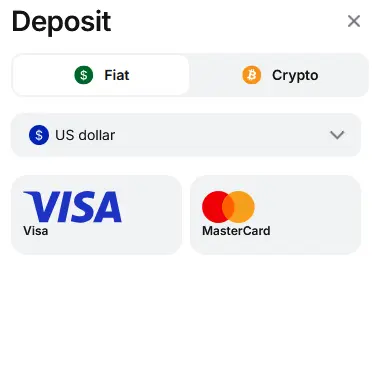
Dollar Deposit at 1Win
How Deposit Methods Vary by Country
This is the part most guides skip, and it matters more than the generic method list above. 1Win’s Cashier detects your account currency and shows a locally relevant set of options rather than the same global list for everyone. A few real examples of how different the menu looks by market:
- Russian ruble accounts see local bank and transfer options such as Alfa Bank, T-Pay, SberPay, VTB, transfer by phone number (SBP), direct card-to-card transfer, FK Wallet, and Sky Pay — none of which appear for USD accounts.
- Egyptian pound accounts see mobile-money and local wallet options including Vodafone Cash, Etisalat Cash, Orange Cash, CIB Smart Wallet, We Pay, BM Wallet, Cash Speed via WhatsApp or Telegram, InstaPay, and Pyramids Cash, alongside standard Visa/Mastercard.
- Mexican peso accounts see SPEI, BBVA, Santander, OXXO Pay, CoDi, Walmart Cash, Airtm, AstroPay, Afirme, BAZ SuperApp, and Paynet.
If your Cashier looks nothing like the USD table above, this is why — it isn’t an error, it’s how the system is designed to work. Always trust what’s actually displayed on your screen over any generic list, including this one.
How to Deposit Step by Step
The process is the same regardless of which specific method you pick:
- Log in to your account, or complete registration if you don’t have one yet.
- Click Deposit in the top-right corner.
- Choose Fiat or Crypto, then confirm your account currency — this determines which methods appear.
- Select a method from the list shown.
- Enter the amount and confirm. Card payments may trigger your bank’s 3D Secure verification step.
- Funds usually appear instantly for cards and local payment systems, and within 3–15 minutes for crypto, depending on network confirmations.
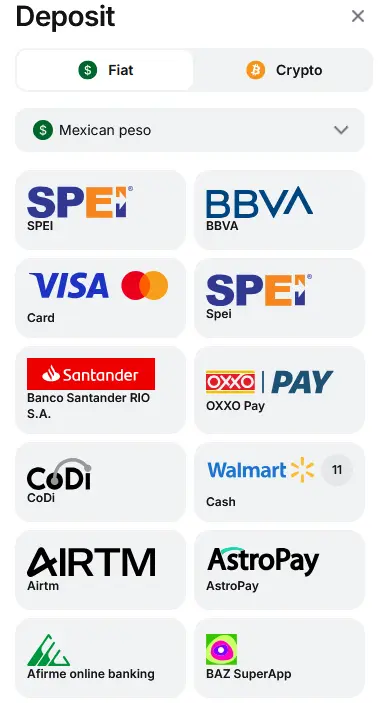
Deposit in Mexican Peso
Fees, Limits, and Processing Times
1Win doesn’t charge its own deposit fees on any method, though your bank or payment provider may apply a currency conversion charge if you’re depositing in a currency different from your account currency. Cryptocurrency deposits receive an additional top-up funded by 1Win itself, separate from any bonus offer. Most fiat and e-wallet deposits process instantly; crypto deposits typically take 3–15 minutes depending on the network. Occasional technical delays can push fiat deposits out to as long as 24 hours, though this is uncommon.
Withdrawals run through the same Cashier section and carry a minimum threshold of $5 per transaction, separate from deposit limits, and require identity verification once certain thresholds are reached — covered in more detail below.
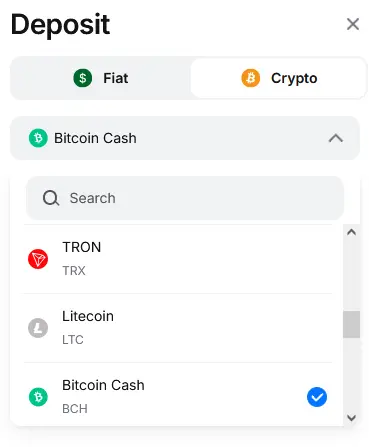
Crypto Deposit at 1Win
Why a Deposit Might Not Go Through
A handful of issues account for most failed deposits:
- Bank-side blocks. Many banks decline transactions to gambling sites by default; contact your bank to confirm whether these are permitted on your card.
- Incorrect details. A mistyped card number or CVV, or a crypto transaction sent on the wrong network (for example, USDT sent as ERC20 when TRC20 was expected), will fail or be lost.
- Below the method’s minimum. Each method has its own floor — check the amount against the Cashier’s stated minimum before submitting.
- Regional availability changes. A method you used before may no longer appear if it was removed for your region; switch to an alternative or check with support.
- Temporary technical issues. Wait 15–30 minutes and retry; if the deposit still hasn’t appeared, contact 24/7 live chat with your transaction ID.
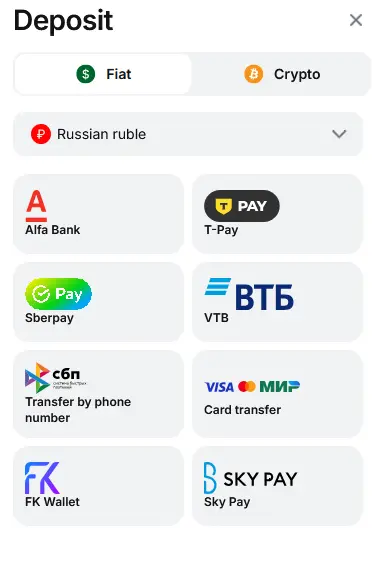
Deposit in Russian Ruble at 1Win
Account Verification and Country Restrictions
Identity verification (KYC) isn’t required to deposit, but it becomes mandatory before your first large withdrawal — specifically once a single withdrawal exceeds roughly $1,000, or after several successful withdrawals. The process has two steps: filling in personal details (name, date of birth, address, passport data) in your account dashboard, then uploading a clear photo of your passport’s photo and registration pages along with a selfie holding the open passport. Verification is typically completed within 1–3 days, and completing it before you actually need to withdraw avoids delays later.
If gambling sites are restricted in your country, cryptocurrency tends to be the most consistently available deposit route, since it doesn’t depend on local banking rails the way card and e-wallet methods do.
 Oliver Bridgewater

